
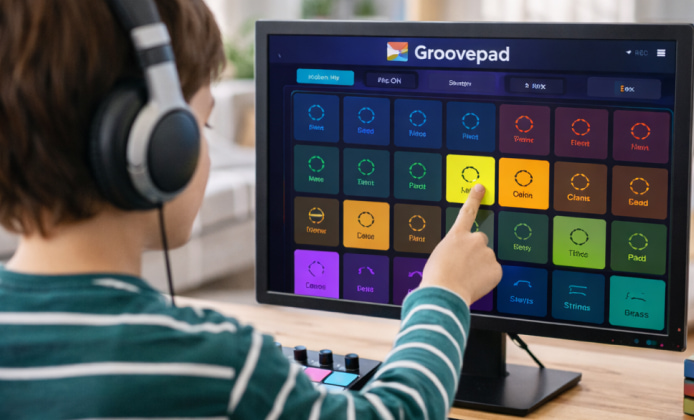
Beatmaking is one of the fastest ways to turn an idea into something you can actually hear, and Groovepad makes that process feel approachable even if you’ve never touched a music app before. In this guide, you’ll learn how to get started, build your first loop, and keep your workflow organized so you can create more and scroll less. If you’re curious about Groovepad for free, you can still do a lot with the core tools as long as you know where to look and how to use them.
What Groovepad Does Well for Beginners
Groovepad is built around a grid of sound pads. Each pad triggers a loop, one-shot, or effect, and your job is to combine them into a groove. You don’t need music theory to enjoy it, because the sounds in a pack are designed to work together.
- Fast starts: Choose a genre pack and tap pads to hear instant results.
- Live performance feel: You can mute, swap, and layer parts as if you’re DJing your own track.
- Short sessions work: Even five minutes can produce a solid loop you can refine later.
Tip: Begin with drums, add bass, then only after that introduce melodies. This order helps your groove feel “locked in” earlier.
Getting Started in a Few Minutes
Start by picking a pack that matches the mood you want. Then build your loop in layers:
- Tap a drum pad to set a foundation.
- Add a bass loop that complements the rhythm.
- Bring in chords or a lead line for character.
- Use effects sparingly to add movement without clutter.
If you prefer browser-based tools, some users look for Groovepad online for free, but you’ll usually get the smoothest timing, best responsiveness, and easier offline practice in the app environment.
How to Structure a Simple Track
A common reason beginners get stuck is repeating the same 4–8 bar idea without a plan. Try this structure:
- Intro (4–8 bars): drums + a light texture
- Build (8–16 bars): add bass and a main chord loop
- Drop (8–16 bars): full groove + lead
- Break (4–8 bars): remove drums, keep atmosphere
- Final drop (8–16 bars): return with a small variation
To keep it interesting, change one element at a time: swap a drum loop, add a short fill, or mute the bass for two bars. When you’re experimenting with free Groovepad, small changes like these can make your track feel intentional without needing extra content.
Quality Check: A Quick Self-Review
Before you share or save a draft, do a 30-second review:
| Check | What to Listen For | Easy Fix |
|---|---|---|
| Balance | Does anything feel too loud or distracting? | Mute one layer, then bring it back gradually. |
| Rhythm | Do the drums and bass feel tight together? | Try a different bass loop that matches the kick pattern. |
| Variation | Does the track evolve every 8–16 bars? | Remove one element for two bars, then reintroduce it. |
| Clarity | Does the lead have room to “speak”? | Mute competing melodies and keep one main theme. |
Download and Device Notes
Many people want an offline setup so they can build beats anywhere, which is why Groovepad free to download is a frequent request. When choosing where to install, keep your device in mind:
- Phones/tablets: Great for quick sketches and live tapping.
- Laptops/desktops: Better for longer sessions, organizing files, and pairing with other music tools.
If you specifically need Groovepad download for laptop for free, check the official app store options available for your operating system and compare requirements like storage space and OS version before installing.
Safe Install Habits You Should Follow
It’s tempting to grab the first link you see, but you’ll have a better experience if you keep your installs clean and official. When you decide to download Groovepad for free, follow these habits:
- Use official stores or the developer’s official pages whenever possible.
- Avoid “bundle installers” that add extra software you didn’t ask for.
- Read permissions prompts and disable anything that seems unrelated to music creation.
Using Groovepad on Desktop
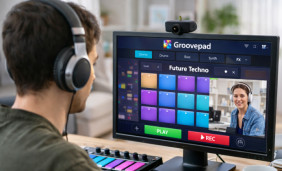
Some creators prefer larger screens for arranging ideas and switching between notes and the app. If that’s you, Groovepad download for PC is worth exploring through legitimate distribution channels that match your Windows version and security settings.
Mini Workflow: From Idea to Shareable Loop
- Pick a genre pack and build a 4-bar groove.
- Create a “B section” by swapping one drum loop and one melody.
- Perform a quick intro and drop by muting/unmuting layers.
- Save versions: “v1 groove,” “v2 with break,” “v3 final.”
With a simple plan and a bit of experimentation, you can turn a few taps into something that feels like a real track. Keep sessions short, keep layers purposeful, and focus on progress over perfection.


 Discover Practical Ways to Mix Beats With Groovepad on PC
 Groovepad App: A Practical Guide to Making Music
 How to Use Groovepad: Free Download, Setup, and Beatmaking Tips
 Groove in Your Browser: A Practical Guide to Making Beats Online
 What Is Groovepad and How to Use?
 Best Apps Similar to Groovepad