
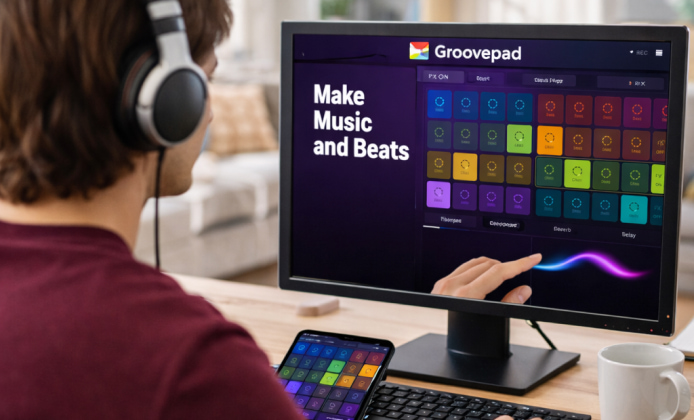
Whether you’re experimenting with loops for the first time or sketching ideas for a full track, a simple groovebox-style app can turn spare minutes into real musical progress. With an intuitive grid of pads, built-in sound packs, and performance-friendly controls, Groovepad is designed to help you build rhythm, melody, and transitions without needing a studio setup.
If you’re new to beat-making, the Groovepad app can feel like a shortcut from “I have an idea” to “I have a hook,” especially when you focus on small, repeatable patterns. Start with a drum groove, add a bass layer, then drop in a lead or vocal chop, and you’ll quickly learn how arrangement changes the energy of a track.
How Groovepad Works (In Plain Terms)
Groovepad is built around sound packs and pads. Each pad triggers a loop or one-shot sound, and your job is to combine them into a cohesive rhythm. The key is to think like a DJ and a producer at the same time: you’re stacking layers, muting parts, and creating movement with transitions.
- Sound packs: curated sets for genres like EDM, hip-hop, trap, house, and more.
- Pads: the playable grid where you launch loops and hits in real time.
- Effects: tools like filters, stutter, or reverb-style changes to create build-ups and drops.
- Arrangement: the “story” of your beat intro, build, drop, break, and ending.
“The easiest way to make a beat feel professional is to remove something at the right moment, not add more.”
A Fast Workflow You Can Repeat
Consistency is what turns random tapping into actual songs. Try this repeatable flow whenever you open the app:
- Pick a genre pack that matches your mood and keep it for the whole session.
- Build an 8-bar loop: drums first, then bass, then one melodic layer.
- Create variation by muting one element every 4 bars.
- Add a build-up using effects, then bring the full groove back for a “drop.”
- Record a short performance and listen back for the best 20–30 seconds.
When you want to explore updates and new sound packs, many people start by looking for a Groovepad app download option that fits their device and preferred storefront, so they can stay current with features.
Tips for Better-Sounding Beats
Groovepad makes it easy to get something playing, but these small habits can make your tracks feel tighter and more intentional:
- Less can be more: if the mix feels crowded, remove a loop before you add another.
- Call-and-response: alternate two melodic ideas instead of running one nonstop.
- Energy control: reserve your strongest layer for the chorus/drop section.
- Punchy transitions: use a short effect burst right before the groove returns.
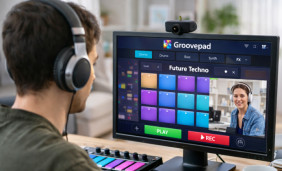
For desktop experimentation, you might see creators mention Groovepad app download for PC in discussions about running mobile-style music tools on larger screens for easier control.
Quick Comparison: What You Get vs. What You Do
The table below separates the built-in capabilities from the skills you develop as you practice. It’s a helpful way to spot what to improve next.
| Built-In Feature | What It Helps You Do | Practice Focus |
|---|---|---|
| Genre sound packs | Start quickly with cohesive sounds | Choosing fewer layers that fit together |
| Pad grid performance | Trigger loops like a live set | Timing: when to add/remove parts |
| Effects and transitions | Build tension and release | Using effects sparingly for impact |
| Recording | Capture your best performance moments | Listening back and refining structure |
Common Use Cases
Groovepad fits different goals depending on how you use it. Here are a few practical scenarios:
- Idea sketching: build a hook in under five minutes, then save it for later.
- Practice sessions: train your ear by experimenting with arrangement changes.
- Content creation: record short performances for reels, shorts, or background audio.
- Collaboration starter: share a loop concept with a producer friend as a reference.
When you’re describing the tool to someone who hasn’t seen it, it can help to phrase it as an app Groovepad style pad-based music maker where you perform loops and transitions in real time.
Installation and Setup Ideas
Getting started is usually straightforward: choose a pack, set your preferred pace, and experiment. Once you open the app, focus on building a “core groove” first and saving it before you start changing packs or stacking too many elements.
For newcomers who want to avoid confusion, it’s smart to follow a clear checklist to install Groovepad app correctly, then test audio output, notifications, and storage permissions before a longer session.
Optional: Playing on a Windows Desktop
Some users prefer a bigger display and keyboard/mouse control for experimenting with loops. If that’s your style, you’ll often see people discuss how to download Groovepad app for Windows using supported methods for running mobile apps in a desktop environment.
FAQ
- Do I need music theory to use Groovepad? No most packs are designed to sound good together, so you can focus on rhythm, layering, and structure. Over time, you’ll naturally learn what combinations create tension and release.
- How can I make my beats feel less repetitive? Try removing one element every few bars, then bringing it back for impact. Small changes like dropping the bass for a bar or muting a melody create movement without needing extra sounds.
- What should I practice first? Practice transitions: clean intros, quick build-ups, and satisfying drops. If you can control energy well, even simple loops will sound intentional and polished.
Once you build a workflow you enjoy, your sessions will become faster and more creative, and you’ll spend less time searching for “perfect” sounds and more time actually making music.


 Discover Practical Ways to Mix Beats With Groovepad on PC
 Groovepad App: A Practical Guide to Making Music
 How to Use Groovepad: Free Download, Setup, and Beatmaking Tips
 Groove in Your Browser: A Practical Guide to Making Beats Online
 What Is Groovepad and How to Use?
 Best Apps Similar to Groovepad